 AI Sidekick
العربية
Summarize a YouTube video in your language
Get the key points in seconds — even when the video isn't in your language. Read what matters before you decide to watch.
Add to Chrome — it's freeNo account, no sign-up. English and Arabic interface.
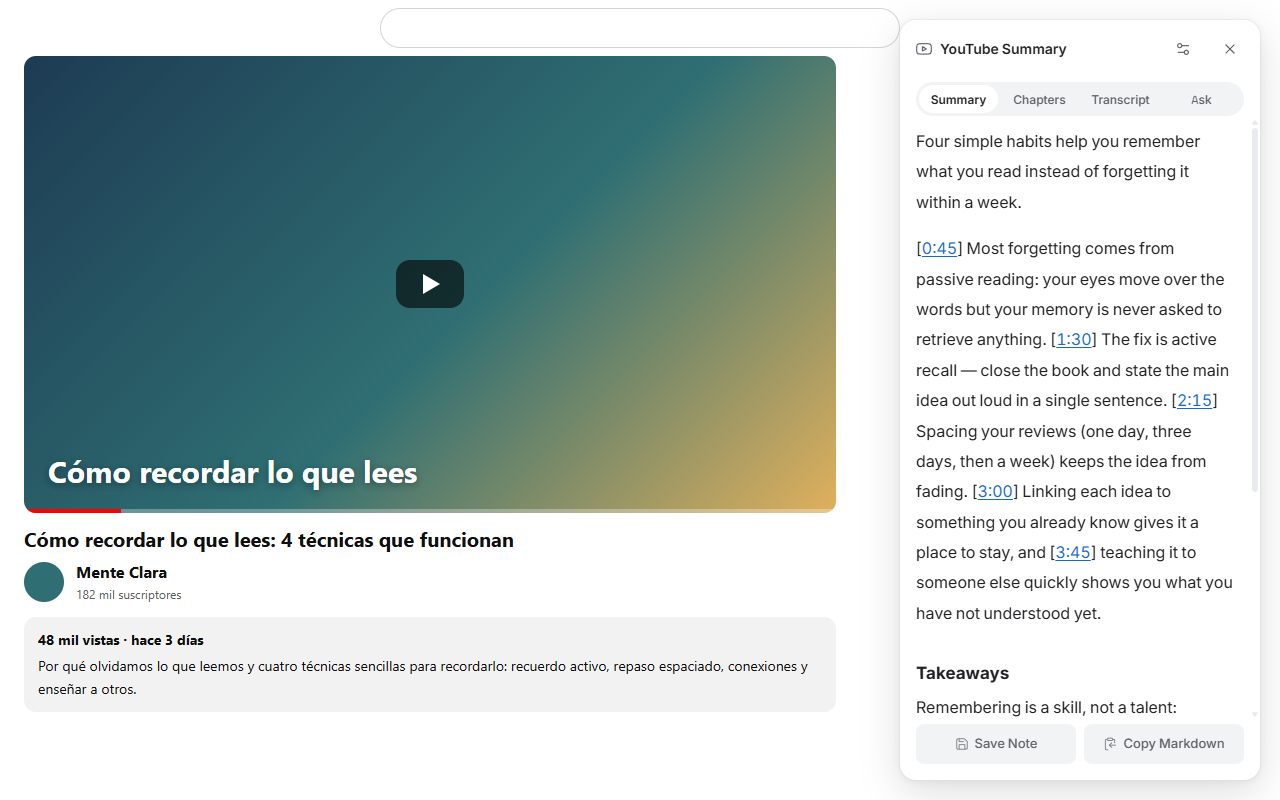
How it works
- Add the extension to Chrome.
- Open a video on YouTube.
- Press Summarize with AI under the video and read the summary.
What you get
- A short summary with timestamps — click one and the video jumps to that moment.
- Chapters, the full transcript, and an Ask tab for your questions about the video.
- Pick the summary language: your interface language, the video's language, English or Arabic.
- Shorter or more detailed: one slider sets the depth.
- Save the summary as a note, or copy it as Markdown.
Questions
Is it free?
Yes. You get a daily allowance through our server, with no account. To go without a daily limit, add your own Gemini or OpenRouter key in Settings.
Which videos can it summarize?
Videos that have captions, in any language. For a video without captions, add your own Gemini key and the extension summarizes from the video itself.
What happens to my data?
Nothing leaves your device before you agree on first run, and the consent screen names what is sent and to whom. Your history and notes stay in your browser. No ads, no tracking across sites. Full privacy policy.
Does it do anything besides YouTube?
Yes: it can translate a whole web page, summarize or explain text you select, and answer questions about the page in Chrome's side panel.
Try it on the next video you open
Add to Chrome — it's freeAI answers can be wrong — check anything important.